There are two main steps to changing your company secretary in Sri Lanka. First, the board of directors should pass a resolution to appoint the new secretary. Next, to notify the Registrar of Companies (ROC) of the change of company secretary, a director needs to log into their existing eROC account and submit Form 20 together with the board resolution and Form 19 within 20 working days of the resolution date.
Table of Contents
Reasons to Change the Company Secretary
After registering your company with the initial secretary, you might need to change the company secretary for following reasons.
Secretary resigns
The existing company secretary may choose to resign from their position as your company secretary. They will submit a formal resignation letter when they resign.
Secretary dies or disqualifies
If the company secretary passes away or becomes disqualified, and no longer holds a valid Certificate of Practice, they cannot continue to act as the company secretary. This can happen if the secretary is declared of unsound mind or insolvent, is convicted of serious offences, or is removed from the Registrar’s register.
Unable to contact secretary
Sometimes you cannot reach the company secretary, or the secretary firm may have ceased operations or closed down.
Board removes secretary
The board can remove the secretary for reasons non-performance, or other matters stated in the company’s articles.
Annual turnover exceeds 1 Million
You might also need to remove the existing secretary and appoint a new registered company secretary, if your company’s annual turnover exceeds 1 million threshold.
How to change company secretary in Sri Lanka?
Here’s how to change a company secretary in Sri Lanka in four simple steps.
- Pass a board resolution to remove existing company secretary
- File Form 20 to notice the change of company secretary
- File Form 19 to appoint the new company secretary
- Registrar of Companies approves the change of company secretary
1. Pass board resolution to remove existing company secretary
Resignation of secretary
In the event the existing secretary resigns, the board of directors should first obtain a resignation letter from the secretary. Next, the board needs to hold a board meeting and pass a board resolution to appoint the new secretary, mentioning the reason for change of company secretary as resignation.
Removal of secrerary
If the company secretary does not resign, the board can still remove them without a resignation letter. The board can approve the removal and appointment of a new secretary in the same resolution, stating the reason such as being unable to contact the secretary, the secretarial firm closing, the secretary’s death, or disqualification


2. File Form 20 to notice the change of company secretary
To edit the secretary details of your company, you should log in to the eroc account as director, using the email address registered with Registrar of Companies (this is available on Form 01) and make a new request for Change of Director/Secretary and Particulars of Director/Secretary (Form 20).
Once you update the secretary details, you can generate Form 20 from the eroc system. Print and sign Form 20 (any director can do this). Then upload a color-scanned copy of the signed Form 20 to the system.


3. File Form 19 to appoint the new company secretary
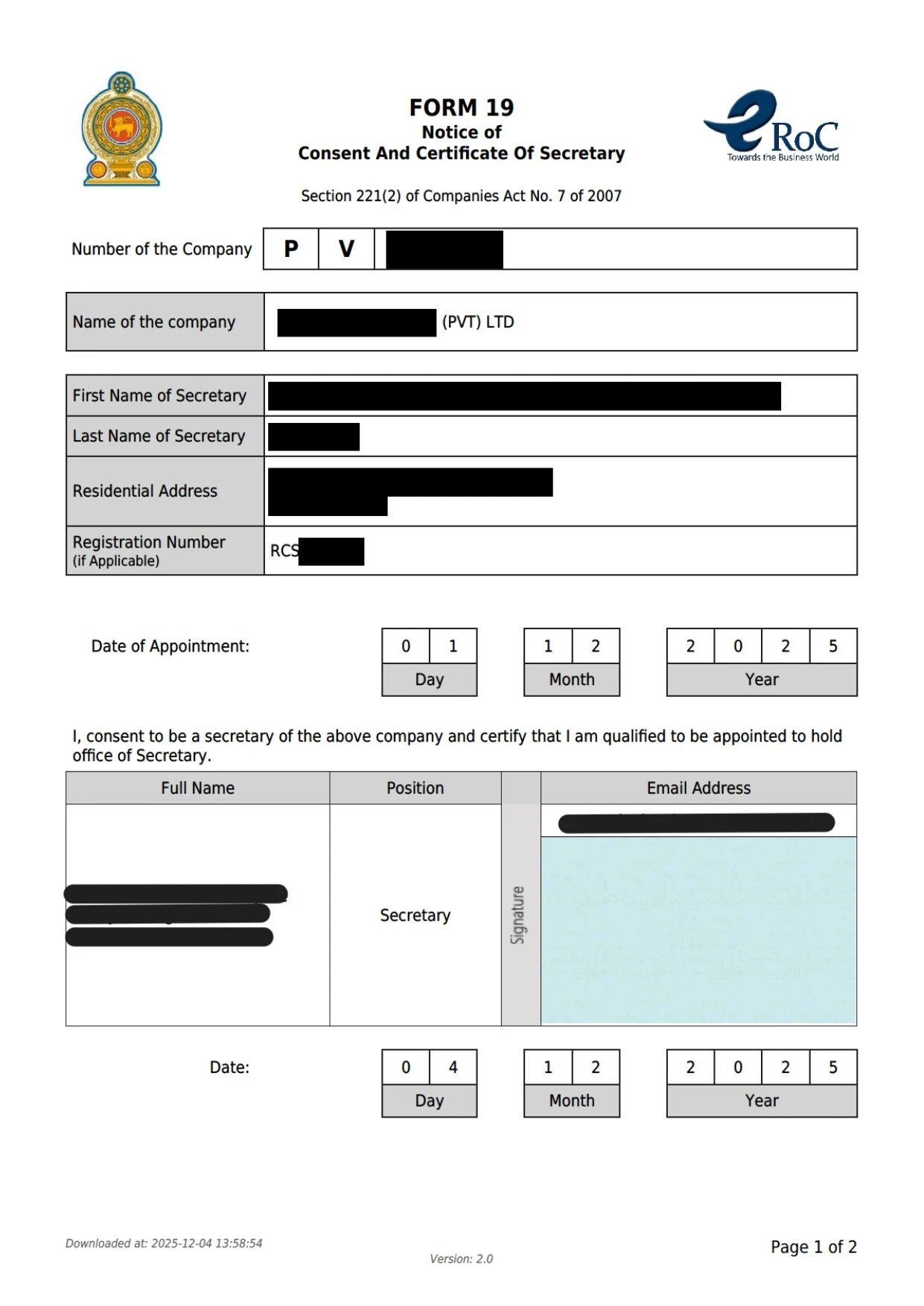
You can also generate the Form 19 (consent and certificate form for the new secretary) from the eroc system by entering the secretary’s full name (exactly as on NIC, Passport, or BR), NIC/Passport/Registration number, Secretary Registration number (if they are a registered company secretary), address with postal code, phone number, and email.. The new company secretary should sign this form with their hand-written wet ink signature. You can upload a color-scanned copy of the signed Form 19 and submit it with the Form 20 and board resolution.
Before appointing a new company secretary, verify they have a valid Certificate of Practice from the Registrar of Companies and satisfy the legal requirements to be act as a company secretary.
If the secretary is an individual, they need to be over 18 years old and a Sri Lankan citizen. For qualifications, they should be a member of the Chartered Governance Institute of the UK and Ireland, or be an Attorney-at-Law in Sri Lanka, or a member of one of these professional bodies: Institute of Chartered Accountants of Sri Lanka, Institute of Chartered Corporate Secretaries of Sri Lanka, Chartered Institute of Management Accountants UK, or Institute of Certified Management Accountants of Sri Lanka.
Your company secretary can also be a partnership firm, or company. When appointing a firm as your secretary, always check the constitutional documents to confirm secretarial practice is clearly stated as part of their business objectives.
Learn more about who can be a Company Secretary in Sri Lanka and who is disqualified from being a Company Secretary.
4. Registrar of Companies approve the change of company secretary
After submitting scanned copies of the board resolution, resignation letter (if the secretary resigns), Form 20, and Form 19, the Registrar of Companies will review and approve the secretary change.
Once approved, you’ll receive an email notification. You can then request a certified copy of Form 20 to notify banks or other institutions about the change company secretary.


Documents to Change the Company Secretary in Sri Lanka
- Resignation letter from the current secretary (if secretary resigns)
- Board resolution approving the removal of the existing secretary and appointment of a new one, as per the company’s articles (if secretary is removed)
- Form 20 signed by at least one director
Work with an expert Registered Company Secretary from Counselit
At Counselit, our Registered Company Secretaries are qualified Attorneys-at-Law and Chartered Accountants, licensed to practice as company secretaries in Sri Lanka. We guide our clients throughout their entrepreneurial journey, taking care of all pre-incorporation and post-incorporation corporate compliance matters so they can focus on growing their business. With timely reminders for annual return filings and expert support at every step, we ensure your company stays compliant and empowered for success.
Have questions or need expert support? Call us at +94760011066 or book a call with our team today.
Frequently Asked Questions
Can I change company secretary if annual return is not filed?
You cannot change the company secretary when your company’s annual return (Form 15) is due and pending submission. First, submit the annual return together with a request to the Registrar of Companies explaining why the secretary’s signature is missing, for example, if you are unable to contact the secretary.
The annual return can be prepared and submitted through a director’s eROC account. Once the return is approved, you can proceed with changing the company secretary.
How long does it take to change the company secretary?
It takes approximately 5-7 business days to appoint a new company secretary.
When do I need to appoint a registered company secretary?
Section 222 of the Companies Act requires for any company with an initial stated capital of 500,000 LKR or annual turnover exceeds 1 million Sri Lankan rupees to appoint a registered company secretary with a certificate of practice issued by the Registrar of Companies.
Can an auditor be a company secretary?
No, you can appoint anyone as company secretary unless they are an auditor of the company.
When to appoint a new company secretary after removing old one?
You shold appoint the new company secretary on the same day you remove the old one. The board resolution for removal of the old secretary and appointment of new secretary should carry the same date.